 🔒 Local-first — your reviews can stay on your machine
Read the reviews you
were never going to read.
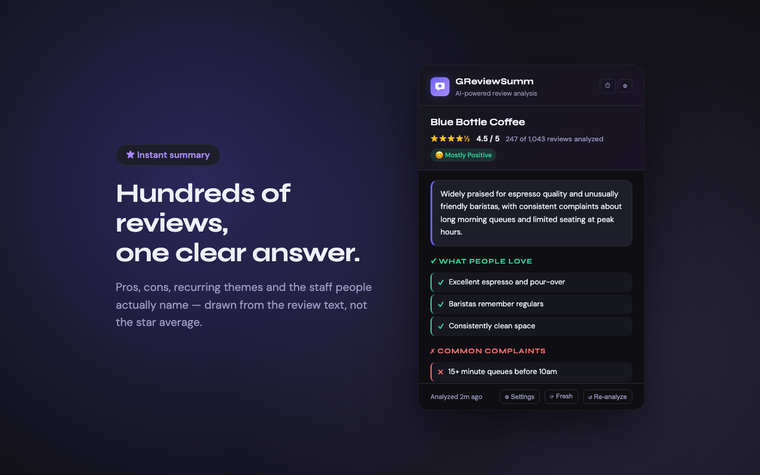
Review Atlas collects the reviews on a Google Maps page and turns them into pros, cons, recurring themes and the staff people actually name — using whichever AI you choose, including a model running on your own computer. It reads nothing until you press the button, and only the tab you are on.
In review at the Chrome Web Store. Until it is listed, it installs from source.
What it actually does
The reviews panel on a busy place holds hundreds of entries you will never scroll through. This reads them for you. Collecting them takes about a minute; the summary that follows takes seconds on a hosted model, longer on one running on your own machine.
Pros and cons
Specific, recurring points drawn from the review text — not a generic star average.
Themes
The topics that come up most: parking, wait times, service, whatever this place is known for.
Named staff
Employees praised by name across several reviews. Reviewers' own names are stripped out before anything is sent to the AI.
Time filters
All reviews, the newest N, or only the last 1, 3, 6 or 12 months.
Your language
Summaries in the reviews' own language, or pinned to one you choose.
Cached
Results and collected reviews are kept for 24 hours, so a second look is instant.
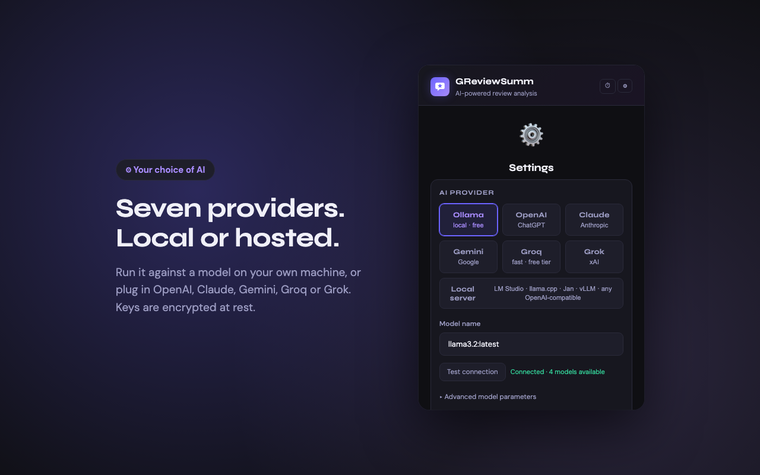
Bring your own model
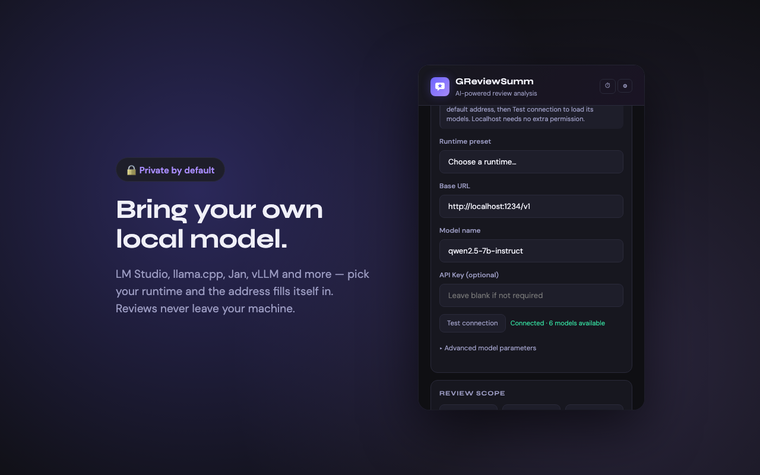
Point it at a model running on your own machine and the review text never leaves your computer. Prefer a hosted API? Those work too — you decide.
Built into Chrome
Runs locally
Or a hosted API
Pick your runtime, get its default address filled in. Hit Test connection and the model list loads from the server itself — no guessing at port numbers or model identifiers.
What it looks like
Privacy, concretely
Not a slogan — here is exactly where the data goes.
No server of ours
There is no backend. Nothing is sent to us, because there is nowhere to send it.
Reviews go to one place
Only to the provider you selected. Choose a local model and they never leave your machine.
Keys encrypted at rest
API keys are AES-GCM-256 encrypted in local storage, never shown back to you, never sent anywhere but that provider.
No analytics
No telemetry, no tracking, no ads, no account. The popup makes zero third-party requests — even the fonts are bundled.
Only when you ask
It reads a page after you press Analyze Reviews, and only that tab. It does not run in the background or on other sites.
Nothing to walk away from
Everything it saves lives on your computer and goes when the extension does. There is no account to close.
Install
Not yet on the Chrome Web Store. Until it is, it loads from source — a few minutes if a terminal is familiar ground. If it is not, the quick start guide covers the same ground without assuming any of this, and says what to do while the listing is still in review.
Get a model running
Optional on a capable computer: the Built-in provider uses the on-device model in Chrome, with nothing to install. Otherwise, the easiest local start: install Ollama, then ollama pull llama3.2 and ollama serve. Any other runtime works too — see the setup guide.
Build the extension
git clone https://github.com/lauming1111/ReviewAtlas.git, then npm install and npm run build.
Load it in Chrome
Open chrome://extensions, turn on Developer mode, click Load unpacked and pick the review-atlas-extension/ folder.
Open a place and hit Analyze
Go to any business on Google Maps, click the icon, press Analyze Reviews. The page will scroll itself while reviews are collected — that is the extension working, not a fault.
The extension is free, and there is no paid version to move you towards. If you would like to leave a tip anyway, there is an Ethereum address: . Transfers cannot be undone, so compare the whole address before sending.